When I start personal projects, I tend to toy with different tools and platforms to see which one fits my requirements. At this stage, I don’t feel easy committing financially to a monthly or longer plan. It is fairly likely that I will use some products for a month or two, then switch due to bad UX/DX flow, performance issues, or other limitations. Another issue independent developers often dread is the inability to proactively prevent overage so you will not be hit by an unexpected charge overnight due to DDOS or your own misconfiguration.
Would it be good if there are free-tier products that have generous free quota, yet strict cut-off limits, so you can use it within quota without worry? Wouldn’t it be even nicer if such providers do not ask for credit card up front so there is never any worry at all?
In fact, the modern cloud landscape has matured to the point where you can build, deploy, and run sophisticated full-stack applications with essentially zero infrastructure cost. With careful research, you can stitch together enterprise-grade infrastructure: data stores, caches, edge functions and containerized backends, all hosted on generous “always free” tiers from major cloud providers.
In this post, I will aggregate the best always-free (not trial) managed cloud offerings across databases (SQL & NoSQL), frontend and application hosting. There are also a lot of open-sourced self-hosted offerings that excel in many scenarios, but since we’re aiming at rapid prototyping, I’ll focus on managed solutions. Using my curated tools, you can start building a production-ready stack with the best managed cloud services all for free!
tl;dr
If you are starting today, use Cloudflare Pages for your UI, Supabase for your data, and Koyeb for your backend logic. Pair with Upstash for caching. This combination provides the fastest onboarding time, highest performance with the fewest “cold start” frustrations, all while staying within $0 monthly costs.
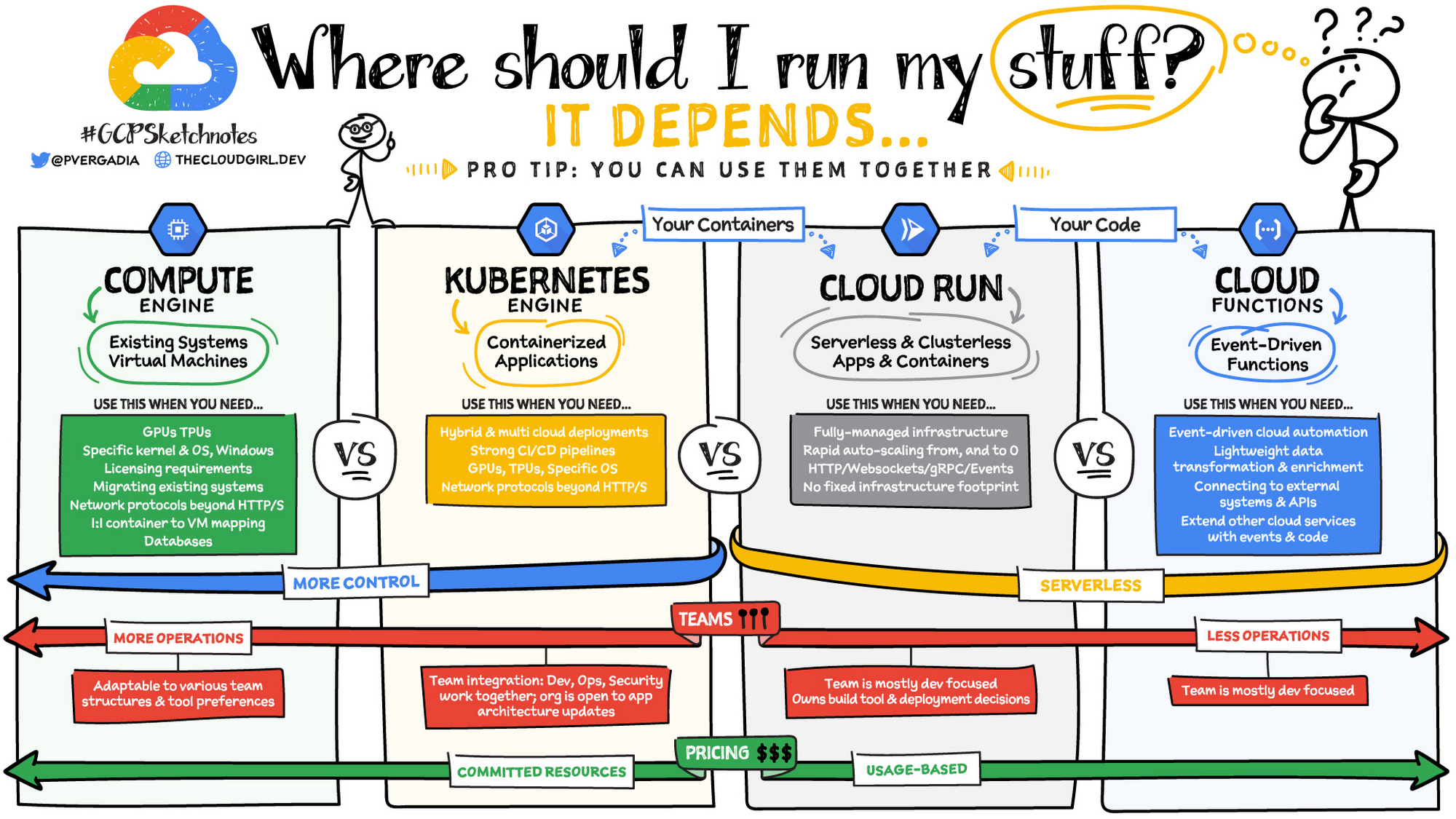
How to choose a compute option depends on your app (architecture, traffic), team structure, and desired levels of control and management.
VMs (IaaS) provides maximum control over the infrastructure, while PaaS, Serverless Containers and Event-driven Serverless Functions offer progressively more managed, serverless platforms. This image by GCP illustrates the trade offs of each compute type (although they left out their PAAS option - App Engine):
If you want to control everything (OS, servers, runtime, infra, etc.) and have always-on performance
- get an Oracle Cloud Infrastructure (OCI)’s Ampere A1 Flex shape VM. This is the most powerful always-free option in the market with 4 vCPU core and 24G RAM and a max of 200GB storage. You can also use your VM to host your containerized apps. While at there, why not check out their other free offerings? Best yet, there is no overage charge as OCI adhere to a strict quota cutoff. You have to take care of security, scaling and other sysadmin tasks yourself.
If you want to host only a simple static website like a blog: Cloudflare Pages (good edge performance), Vercel, Netlify, Github Page (for Jekyll SSG users).
For a React/Vue/Next.js app, go with Cloudflare Pages (for high limits) or Vercel (for DX).
To add event-driven logic to your site:
if you use Python or Next.js -> consider Vercel Functions
Otherwise, Cloudflare Workers has the most complementary services in the platform (KV store, database, vector store, etc.). If you don’t mind self-metering for overage, AWS Lambda, Google Cloud Functions are industrial choices.
You can also use these serverless function platforms to build stateless web services, APIs, microservices and batch jobs.
For a full fledge traditional app, deploy to free PAAS like Google App Engine or Azure Web Apps (no custom domain though).
For containerized apps, depends on your traffic pattern:
- stateless microservices and web apps that might have spiky traffic and need to scale to zero when idle -> Google Cloud Run (serverless)
- steady, predictable traffic patterns -> take the OCI VM route (more efforts), or use Render (long cold start).
For a kitchen-sink backend-as-a-service platform (database, authentication, storage, functions, etc.), try Supabase and Firebase.
Types of Free-tier providers
To start, let’s be aware that there are 3 types of cloud providers offering free tiers:
- always free, strict cut off: You do not need a credit card to sign up and use their free plans. When you create a resource, you can specify the free tier type and it will just run inside the quota. Once quota is reached, your provisioned resource is stopped. There is no worry of overage charge. Most of the providers I listed in this article belong to this group. Oracle is the only exception in this group, which requires credit card for identity verification, but will implement strict quota limit so you will never be charged in a free-tier account.
- always free, with possible overage: You need a credit card on file to use their free services. There is no spending limit or gatekeeping to stop the resource when your usage exceeeds the free limit. You have to proactively prevent overage. The always-free tier of GCP (except Firestore), Azure (except Azure SQL Serverless), AWS are in this group.
- free trial that is time or monetary-based: For example, free products from GCP, Azure and AWS that last for a few months to a year, or a fixed $300 credit that you can use to try any service in 30 days.
In this post, I will focus on ongoing “always free” tiers (not trials or initial credits), and will prioritize the Type 1 providers that offer worry-free quota cutoffs.
I will also cluster them by user scenarios:
| purpose | free tool | what I use |
|---|---|---|
| Managed databases | Oracle, Supabase, Neon, Upstash Redis, Azure | local Postgres - migrate to Supabase soon |
| static site hosting | Firebase Hosting, Github Pages, Cloudflare Pages | Cloudflare Pages |
| SPA | Vercel, Cloudflare, Netlify | Cloudflare Pages with Functions |
| App hosting | Render, Google App Engine/Cloud Run, Azure App Service (no custom domain), Koyeb | x |
| Serverless functions | Vercel Functions, Cloudflare Worker, Netlify, Google Cloud Run Function | Cloudflare Workers |
| VM | Oracle Cloud, Google Compute | Oracle Cloud |
| Private container registry | my blog post | Gitlab Container Registry |
| CI/CD | Github Actions, Gitlab Pipeline/Runners, CircleCI | Github Actions, Gitlab Pipeline/Runners |
1. Data Layer: Managed SQL and NoSQL
A modern app needs persistent data. Let’s take a look at free-tier offerings for fully managed relational, document, key-value, and in-memory stores, where the provider handles backups, scaling, patching, etc. A newer breed of Backend-as-a-Service (BaaS) offerings stand out as they provide pre-built server-side features like authentication, database management, hosting, file storage, notifications, SDKs and APIs, so developers can focus on rapid prototyping on the user-facing part of apps.
Note: If you are building an AI app involving embeddings, pick an integrated solution providing native vector support in an existing data platform. This way you reap significant performance gains by co-locating data and reducing latency in data movement and maintenance of multiple platforms.
Which should you choose?
- Backend-as-a-Service → Supabase (fullstack Postgres + extras: database, auth, storage, sub and edge functions as a single package so you don’t have to write a backend API).
- Development with isolation → Neon (many projects/branches).
- Already in Azure stack or migrating from on-prem SQL Server → Azure SQL Database Serverless (good free quota, no overage).
- Small production/low traffic → CockroachDB (best free limits/resilience) or Oracle (more storage).
- Various data format/flexible schemas → Oracle NoSQL or Firestore (Firestore wins for realtime/mobile).
- High-scale key-value → DynamoDB (most generous limits).
- Caching/Redis use cases → Upstash (serverless) or Redis Cloud (traditional provisioned).
Relational SQL Databases
Best for structured data, complex relationships, and financial transactions, free managed SQL databases has matured into two categories: Modern Serverless (best for development and DX) and Traditional Cloud Providers (best for enterprise-grade security and automation).
Serverless databases like Neon, Supabase, CockroachDB and Prisma different from traditional managed database (fixed database compute/size and price), as they employ a usage pricing. You are only charged for the queries you execute and the amount of data you store. The provider will scale both compute and storage resources according to demand. With this model, storage is usually separated from compute, allowing your database to “sleep” when not in use.
Note from the following table that serverless providers meter usage with different metrics: by operation (Prisma), request (CockroachDB), egress (Supabase) or compute/memory hours (Neon, Azure). Per Prisma’s FAQ, an average operation is 10kb, meaning a 5GB bandwidth = ~500k operations.
They are implemented using a tiered architecture. The user will interact with an API or proxy gateway that handles the routing to backend resources automatically. Behind the gateway, pools of execution workers handle requests for any queries they receive. The actual data is maintained in a third layer, which any of the execution workers can access and manipulate.
| Provider & Engine | Free Quota/Limits | Pros | Cons | Best For |
|---|---|---|---|---|
| Neon Serverless PostgreSQL |
- 500MB storage per project - 100 compute-hours per project/month - Up to 100 projects - 10 branches per project - Scales to zero (autosuspend after 5 min inactivity) |
- Database branching (great for testing/PRs) - High project limit |
- Small compute/storage - Cold starts on resume |
Dev workflows with branching (like Git for databases), prototyping, Ideal for devs experimenting with multiple isolated DBs. |
| Supabase Serverless PostgreSQL (BaaS) |
- 500 MB storage per project - Unlimited projects - 1 GB file storage - 50k monthly active users (Auth) - 5 GB egress - Pauses after 1 week inactivity - 50k monthly edge function invocations |
- Built-in Auth, Auto-generated APIs from db schema, instant update, realtime subscriptions, file storage, edge functions - Excellent dashboard and docs, with on prem migration docs |
- Tiny database size - Frequent pausing disrupts always-on needs unless bypassed by cron job - Shared resources (potential noise) |
A full “Backend-as-a-Service”, ideal for hobby fullstack apps needing Auth & Real-time built-in. |
| CockroachDB Serverless PostgreSQL |
- 10 GiB storage - 50 million Request Units/month (queries/read-writes) |
- Generous free quota - Built-in distribution/high availability - auto-scaling - Postgres wire-compatible |
- Heavy queries burn RUs fast - Less extras (pure DB focus) |
Low-moderate traffic production, fast/resilient/multi-region needs, apps outgrowing other smaller free tiers. |
| Prisma Serverless PostgreSQL |
- 10 databases - 1 GiB storage - 100k CRUD operations |
- Generous free quota - No cold starts - global caching (using Cloudflare) - Built-in connection pool - Able to set spending limit for paid services |
- Limited free operations | Wants edge performance + Postgres, integrating with existing Netlify/Vercel app |
| Azure SQL Database Serverless Serverless MS SQL Server |
- 10 free databases - 100,000 vCore-sec of compute per month - 32 GB data storage, 32 GB backup storage per database |
- True SQL Server engine (T‑SQL, stored procedures, CLR, etc.) - Generous free quota - auto-scale, backups, patching, HA - auto-pause to avoid overage charge - Vector store - Portal metrics to track free usage -integrate with other MS data tools like Power BI and Azure Data Studio |
- All 10 db must be in the same region - No long-term backup retention, PITR only 7 days. - No Elastic Pools or Failover Groups |
Enterprise-grade management, great for .NET, enterprise SQL workloads, migrate on-prem SQL Server to cloud, expand and test new db |
| Oracle Cloud Always Free Autonomous Database Transaction Processing or Data Warehouse |
- 2 DBs - 20 GB storage each - 1 OCPU per DB - Always on |
- Massive storage and compute - enterprise-grade security and automation (auto-tuning, patching) - No inactivity pause - AI Vector search |
- credit card verification - Oracle-specific features/learning curve - Limited to 2 DBs total |
Most generous free tier, for small-medium transactional/analytics workloads needing more power/storage and enterprise-grade automation. |
| Oracle Cloud Always Free MySQL Heatwave Managed MySQL with Lakehouse |
- 1 ECPU w/ 16GB memory - 50GB storage/backup - 10GB Lakehouse storage - AutoML - Vector Store |
- Massive storage and compute - in-database LLMs, and AutoML. - query multiple formats (JSON in object storage, embeddings, structured data) |
credit card verification | Massive enterprise RAG/Analytics/AI workload |
| Aiven PostgreSQL & MySQL Dedicated VM |
- single-node instance with 1 CPU, 1 GB RAM & 1 GB storage | - always-on - isolated resources |
No connection pooling with only 20 max connection | Small production apps that need a standard connection string. |
Serverless NoSQL and Redis
These products can store key-value, document or multiple data models, offering flexibility in handling dynamic schemas. They are ideal for modern apps with large volumes of rapidly changing data, that need scaling for high availability.
| Provider & Engine | Free Quota/Limits | Pros | Cons | Best For |
|---|---|---|---|---|
| MongoDB Atlas Document NoSQL |
- 512 MB storage on an “M0” cluster. - Shared CPU/RAM - Limited connections (~500 max) - Data transfer limits (rolling 7-day) |
- industry standard for document databases - Full MongoDB features (queries, indexes, aggregation) - Multi-cloud (AWS, GCP, Azure) - Native JSON support - built-in vector search for AI apps - Easy setup/dashboard |
- Shared resources (variable performance) - No backups or auto-scaling - Not for high-traffic production |
Prototyping, small apps/MVPs with flexible schema, JSON data, content management, mobile apps, and AI vector search. |
| Google Cloud Firestore (Firebase) Document NoSQL (BaaS) |
- 1 GiB storage - 50K reads/day - 20K writes/day - 20K deletes/day - 1 DB per project |
- Realtime instant sync, offline support - Built-in auth, storage, static hosting - excellent mobile/web SDKs - no overage - support ACID transactions, SQL-like queries, and indices |
- Daily quotas reset (bursts limited) - Querying more limited than MongoDB - deep nesting of data become expensive or complex to manage. |
Real-time mobile/web apps (chats, live dashboard, games), fullstack with Firebase ecosystem. |
| Oracle Cloud Always Free NoSQL Managed Serverless |
- 133 million reads/write each per month - 3 tables - 25 GB storage per table |
- single-digit ms response times - support using SQL-like queries to access and manipulate NoSQL data - ACID transactions - flexible data models |
credit card verification | Apps requiring instantaneous response time, have continuously evolving data models, and produce and consume data at high volume and velocity, such as IoT data, real-time personalization engines or fraud detection. |
| Azure Cosmos DB free tier Managed Serverless NoSQL |
- 1000 RU/s (smallest provisioned unit: 400 RU/s = ~1 billion reads/month) - 25 GB storage/month - vector search |
- SLAs - high availability - geo-replication |
- tricky pricing model - need to monitor for overage - data egress fee above 5GB/month |
A multimodel distributed database with a series of consistency models that can be mapped to how your application works. |
| AWS DynamoDB Serverless KV store |
- 25 GB storage - 25 Write/Read Capacity Units (~200M requests/month) |
- Generous for moderate usage - Serverless auto-scaling - Tight AWS integration (Lambda, S3) - Highest scale/throughput (<10ms latency), high availability |
- Capacity planning complexity - Overages charge quickly - learning curve |
High-scale, professional serverless web apps, high-read/write workloads, gaming leaderboards, session stores. |
| Upstash Redis Serverless Redis (key-value/in-memory) |
- 256 MB storage - 500K request/month - 1 database - Scales to zero (pauses on inactivity) |
- Redis-compatible + vectors - REST API (accessible from Edge functions), integrates closely with Vercel (I was redirected to Upstash when I was toying with using a KV store in my Vercel Function, since Vercel has obsoleted its own offering.) -Global replication (1 read replica) |
- Cold starts possible - Inactivity archiving (with warnings) |
caching and rate-limiting at the edge, queues, session stores in serverless apps (e.g., Vercel/Next.js). Ideal for bursty/low-constant use. |
| Redis Cloud Essentials Redis (key-value/in-memory) |
- 30 MB storage - 30 concurrent connections - Fixed size instance |
- Full Redis features/compatibility (e.g., RedisJSON, RediSearch, and TimeSeries) - Always on (no pausing) - Multi-cloud deployment |
- Very small storage/limits - Basic features only (no advanced like vectors free) |
prototyping advanced Redis features like searching or JSON handling, need persistent Redis without serverless pauses. |
| Aiven Valkey KV store in dedicated VM |
- single-node instance with 1 CPU, 1 GB RAM & 1 GB storage | - always-on - isolated resources - open-source - vector search via valkey-search |
no automatic failover | Co-locate with Aiven Postgres/MySQL as a cache layer in front of PostgreSQL to speed up read-heavy workloads, scale concurrent reads, manage sessions and rate limit. |
2. Presentation Layer: Frontend & Static Hosting
A modern frontend should be fast, global, and edge-delivered, where SEO and speed are priorities. Cloudflare, GitHub, and GitLab Pages are fantastic for pure static hosting like a blog, while Vercel and Netlify excel with modern frameworks like React, Vue, Svelte, or Next.js, providing easy Git integration and performance features.
Simple Static frontend (e.g., blogs)
There are numerous options for hosting a static site (blog, marketing/doc site) or any frontend that has static assets. When I started my blog, I first used Azure Web App (10 free web apps) but switched to Firebase Hosting. Later I coupled it with Github Actions for continuous deployment. I have recently moved the whole setup to Cloudflare Pages to take advantage of unlimited bandwidth, unlimited sites, and unlimited requests. It leverages Cloudflare’s global edge network to ensure my site loads instantly anywhere in the world.
Github Pages is also a very popular choice, especially when you have a Jekyll site as it can be auto-deployed without even manual Github Actions setup. One caveat, however, is the mandate for public repos.
Similarly, Vercel, Netlify and Render also offer free static site hosting that are popular among bloggers.
Frontend & Full-Stack JS
For Single Page Applications (SPAs) with a frontend and backend, these following platforms are optimized for frameworks like Next.js, Nuxt, and SvelteKit. They focus on “Git-push-to-deploy” workflows.
Chose Cloudflare for unlimited bandwidth and best edge performance, Vercel/Netlify for framework developer experience.
| Provider | Free Quota/Limits | Pros | Cons | Best For |
|---|---|---|---|---|
| Vercel | 100 GB bandwidth, 6,000 build minutes/month, and 1 million serverless function invocations. | Framework-optimized (Next.js), Exceptional DX with “Preview Deployments” for every Git push, generous bandwidth, edge caching | Strict execution limits (10s timeout for functions) | React/Next.js. Frontend-heavy apps, SSR/SSG, portfolios, high-performance landing pages. |
| Netlify | 100 GB bandwidth, 300 build minutes, and 125,000 serverless function requests. | Exceptional built-in features like Forms, Identity (Auth), and Split Testing; very easy to manage DNS and SSL. | Build minutes are significantly lower than Vercel (300 vs 6,000). | Static/JAMstack sites that need backend-like features (forms/auth) without writing a full server |
| Cloudflare Pages with Functions | Unlimited bandwidth/builds/sites, 100k Workers requests/day | Global edge speed, truly unlimited bandwidth | Workers limits for compute | High-traffic static sites, edge logic |
3. Logic/Execution Layer: App/API Hosting
This is where your backend or fullstack apps’ business logic lives. The goal here is to host your code (or containers) and let the hosting platforms handle deployment, scaling, CDN, TLS, and previews.
We will review app hosting in three distinct paths: Serverless APIs, traditional and containerized apps, and heavy-duty VMs.
The Always-On Strategy
Most tradtional PAAS (app and container) free tiers put your app to “sleep” after a specific duration of inactivity (a “cold start”). If you need your app to respond instantly 24/7, consider these tactics:
- use a Cron Job to send a request to your service every few minutes (e.g., every 15-30 mins) to keep it “active” and prevent deep sleep.
- use External Pings like UptimeRobot to ping your URL regularly.
- move to a VM.
The Scaling Strategy
For apps that might go viral, use Google Cloud Run (for Docker containers) and Cloudflare Workers (for edge functions) to scale to zero when no one is using them, and scale to thousands of users instantly. Just beware of usage limits when scaling up.
Serverless Functions
Similar to the SPA choices, we can use popular FAAS (function-as-a-service) platforms for event-driven code (e.g., an image resizer, a chatbot, responding to an event triggered by another cloud service, or a simple API endpoint). Notice that the big 3 (AWS, Azure, GCP)’s free tier do not cutoff after you reach the free quota. Moreover, my personal experience with Azure is that even though you can deploy and run functions for free, it requires setting up a Storage account (nominal charge) for logging purpose.
To stay straightly in free tier, consider Cloudflare, Netlify and Vercel, all of which offer a free-tier with strict quota cutoff and no credit card on file. That means accidental overage is a non-issue, excessive request will just be rejected.
Which to choose?
- Choose Vercel → if your application can tolerate very small, infrequent delays and you prefer a platform that may be more integrated with a frontend framework like Next.js, or if you want native Python support.
- Choose Cloudflare → if the absolute fastest cold start time is critical for your application, such as for a high-traffic API or a real-time service where a delay of even milliseconds matters. If you have a Python app, consider if you can live with Pyodide limitations and limited packages support.
| Product | Quota | Language support | Recommended usage |
|---|---|---|---|
| AWS Lambda | - 1 million requests/month - 400,000 GB-seconds compute/month |
Node.js, Python, Ruby, Java, Go, .NET, custom runtimes | Performance. Already in AWS stack. Need more new features. |
| Azure Functions | - 1 million executions/month - 400,000 GB-seconds/month |
.NET, Node.js, Java, PowerShell, Python, custom runtimes | Already in Azure stack. |
| Google Cloud Run Functions | - 2 million invocations/month - 180,000 vCPU-sec/month - 400,000 GB-sec, 200,000 GHz-sec compute/month - 5 GiB outbound data transfer |
Node.js, Python, Go, Java, .NET, Ruby, PHP, custom runtimes | Already using GCP. |
| Cloudflare Workers | - 100,000 requests/day - 10 ms CPU per invocation (does not count wait time) |
JavaScript, TypeScript, WASM-compilable (Rust, C, Python (beta) etc.), JS-compilable languages | High performance edge delivery, especially if using JavaScript or TypeScript (Cloudflare uses V8 isolates), no cold start |
| Netlify Functions | - 300 credits/month (5 credits per GB-hour compute) | JavaScript, TypeScript, Go | Web applications, JAMstack sites, headless CMSs. |
| Vercel | - 1 million invocations/month - 4 Active CPU hours/month - 360 GB-hours Provisioned Memory/month - deploy preview |
Node.js, Go, Python, Ruby, Bash, Deno, PHP, Rust | Next.js-based app, JAMstack sites, headless CMSs. Many starter templates to jumpstart dev and deploy! |
Cloudflare
I have used multiple Cloudflare products, from their excellent site management free plan, tunnel, WAF and Cloudflare Pages for hosting this blog. I found their UX very straightforward with no-nonsense documentation should I need to delve deeper. When I want to try out a cloud compute platform, they are the first coming to my mind. The good thing is that they belong to the 1st type of provider (instance or quota based, strict cut off). Best of all, they do not require a credit card for signup. I have used it to build a small app that uses Cloudflare Pages for the frontend, Worker functions for backend logics and Worker KV to store autocomplete data.
Cloudflare Workers’ Free Plan is a robust option for developers looking to explore serverless computing without incurring costs, while still benefiting from Cloudflare’s global edge network. The free tier includes a complete suite of services and is ideal for:
- Hosting APIs or microservices with limited traffic.
- Building real-time applications using Durable Objects.
- Storing and retrieving small amounts of data with KV or R2 storage.
- Running lightweight machine learning tasks with Workers AI.
Cloudflare Workers support Python in beta as of late 2024, powered by Pyodide and WebAssembly for serverless execution. You can write and deploy serverless Python code that runs at the edge, similar to JavaScript Workers. > Some advanced libraries may require adaptation since Workers run in a specialized environment.
I have consolidated their free offerings into this table:
| Service | Free Tier Limits | Use Case |
|---|---|---|
| Workers | 100K requests/day | Serverless functions |
| KV Namespace | 1GB storage, 100K reads/1K writes per day | Eventually consistent KV data store for configuration data, service routing metadata, personalization (A/B testing). Excels at high-read scenarios where immediate global consistency isn’t strictly necessary. |
| D1 Database | 5GB storage, 5M reads/writes per month | Lightweight serverless SQL database for relational data, including user profiles, product listings and orders, and/or customer data. |
| Durable Objects | 400K GB-seconds, 1M requests/month | Global coordination across clients; real-time stateful applications; strongly consistent, transactional storage. |
| R2 Object Storage | 10GB storage, 1M operations/month | S3-compatible object storage for user-facing web assets, images, machine learning and training datasets, analytics datasets, log and event data. |
| Workers AI | 10,000 Neurons/day. Models are priced differently. | Serverless GPU-powered ML |
| Analytics Engine | 100,000 written, 10,000 read/day | Time-series data analytics |
| Vectorize | 30 million queried vector dimensions / month | Vector search & embeddings queries |
Vercel
Unlike Cloudflare Workers which provides nearly the whole kitchen sink, Vercel is more focused on the function and config offerings.
It is super easy to start, as a lot of tasks can be directly applied from templates. For example,
- setting up rate limits
- Hello World:
- Choose “Python Hello World” or “Flask Hello World”.
- Click “Deploy” → Imports to your GitHub → Auto-generates
api/index.py(Hello World handler) +requirements.txt(with Flask if chosen). - CLI equivalent:
vercel initprompts for templates, then select “Flask”. - Result: Full scaffold (e.g., Flask app with routes, deps pre-filled) in one click with no manual editing.
Vercel Functions also natively support Python (e.g., api/hello.py) as serverless endpoints. It handles WSGI/ASGI for frameworks like Flask or FastAPI.
Similar to Cloudflare, it allows frictionless deploys from Git (Import your repo directly in the dashboard, then pushes to main trigger builds/deploys), branch previews for testing changes without affecting production, and good logs/observability in the dashboard.
Deno
Deno Deploy is a new serverless compute offering. Similar to Cloudflare Workers, Deno Deploy allows you to deploy code to edge servers running Chrome’s V8. Because of this runtime choice, it has many of the same benefits and limitations of Cloudflare Workers (works quicker than VMs and AWS Lambda, high performance, no support for opening TCP connections or using full Node.js libraries). It offers a free plan for small or prototype projects: 12 global regions, 100GB bandwidth, 1 million requests, 300k KV write, and 450k KV read units monthly.
Container & API
What if your app is written in Python (Django/FastAPI), Go, Ruby, or Java, and you want to deploy your app or container to be always-on? Here are the free options that handle app runtime, scaling, and deployment (code or containers) without infrastructure management:
| Provider & Type | Free Quota/Limits | Pros | Cons | Best For |
|---|---|---|---|---|
| Google App Engine Managed App Platform |
- 28 frontend instance hours/day (F1) - 9 backend hours/day - 1 GB outbound data/day - Integrated storage/search quotas |
- Full auto-scaling (to zero) - Tight GCP integration (datastore, tasks) - Supports Python, Node, Java, Go, Ruby, PHP |
- Sandbox restrictions (limited writes/system calls) - Less custom runtimes - Daily limits cap bursts |
Small-to-medium structured web apps/backends. Ideal for low-traffic production with GCP services. |
| Google Cloud Run Serverless Containers |
- 2M requests/month - 180k vCPU-sec - 360k GB-sec memory - Scales to zero |
- Run any prebuilt container/image or build from source using approved builders - Generous for moderate traffic - Global deployment |
- Cold starts - Stateless/ephemeral - Limited free outbound |
Containerized microservices, APIs, event-driven workloads. Great for bursty/serverless apps. |
| Azure App Service Managed Web/API Apps |
- 10 apps - 60 CPU minutes/day/app - 1 GB RAM/storage/app - Shared infrastructure - Multiple apps allowed |
- Broad language support (.NET, Node, Python, Java, PHP) - Git/deploy slots |
- Strict daily CPU throttle - No SLA (dev/test only) - Potential unloading |
Dev/testing, low-traffic demos/prototypes. Not sustained use. |
| Koyeb App and Container |
512MB RAM, 0.1 vCPU and 2GB storage, free DB w/ 5 hr/month and 1G RAM, 0.25 vCPU and 1GB storage | No payment on file - co-locate app with data - Pre-Built Docker Images - quick deploy tutorials for multi-language apps from Git or prebuilt image |
Limited resource (CPU, storage) | Small production APIs or bots |
| Render App and Container |
750 free instance hours/month, 100 GB bandwidth. | All-in-one static + dynamic - Native Docker support - very simple dashboard - automatic SSL. |
app sleeps after 15 mins of inactivity, long cold start (30s - 1 min) | Staging fullstack with backend needs where the initial loading delay isn’t a dealbreaker. |
If you are hosting your Python app, you can also give PythonAnywhere a try.
Let’s look at the two offerings from Google:
App Engine
Google’s Always Free offerings offers the App Engine in two different flavors: F1 and B1. Notice that just like Compute, you have to monitor usage to prevent overage fee. For F1, it is 28 hours per day and 1 GB of outbound data transfer per day. Here’s a tutorial for deploying a Django app to App Engine for free.
To avoid GCP from scaling up additional instances due to peak traffic (which will incur charges), set up your app.yaml to stay within the free tier with max_instances:
runtime: python38
instance_class: F1
automatic_scaling:
  max_instances: 1
Cloud Run
If your application code is already in a container and meet these requirements, you can use Cloud Run to host it instead. Again, set your max_instances to ensure your costs stay low.
Cloud Run has two billing settings, each with the following free-tier quota:
- Request-based billing (default): Cloud Run instances are only charged when they process requests, when they start, and when they shut down.
- CPU - First 180,000 vCPU-seconds free per month
- RAM - First 360,000 GiB-seconds free per month
- Requests - 2 million requests free per month
- Instance-based billing: Cloud Run instances are charged for the entire lifecycle of instances, even when there are no incoming requests. Instance-based billing can be useful for running short-lived background tasks and other asynchronous processing tasks.
- CPU - First 240,000 vCPU-seconds free per month
- RAM - First 450,000 GiB-seconds free per month
Here’s an example of deploying a Flask app container to Cloud Run.
Render
I once used Render to deploy both django (natively supported) and ASP.NET (as container) apps, but had to deflect because the free instance has extremely long cold start. In a nutshell, after pushing to your repo, Render will have to build a new Docker image out of it and launch the container, simply because there is no persistent storage. This sometimes results in sometimes 1 minute start. I also took the upgrade path ($7/month) but found the price/performance ratio lacking, compared with DigitalOcean. In the end, I containerized both apps and moved to aN Oracle Ampere VM.
The good thing is that the Render provisioning and deploy UX are all very sleek, they also don’t ask for credit card during signup.
For free-tier, there are three different consumable resources to consider:
- Services (Web Service, Postgres, etc.) 750 hrs/account/month Free Tier Service instances (512 MB RAM and 0.1 vCPU) have a collective total of 750 hours of free execution. Upon reaching 750 hours of processing all Free Tier Services are suspended. There is no overage charge.
- Bandwidth Usage 100G outgoing Each workspace receives a monthly 100GB egress bandwidth (network traffic sent by your code). This is shared across all services. Exceeding allotted Bandwidth does result in automatic overage charges $30 for additional 100 GB blocks.
- Build Minutes 750 min All application Services (Web Service, Background Worker, Private Service, Cron Job) have a Deployment phase, deployments occur on Render either automatically in response to you pushing code to GitHub, or manually depending on your configuration. These deployment phases consume Pipeline Minutes. Deployments are spend limited and defaults to $0 overages allowed, meaning that exceeding Pipeline Minutes results in deployments failing and no overage charges by default.
VMs and IaaS
When you need full control to host everything yourself (e.g., servers, app containers, Redis, VPNs, bots, or running non-containerized software), free IaaS/VM tiers deliver surprising power. The provider handles infrastructure and hypervisors. In return, you must manage the OS, security, and updates yourself.
There are really just 2 major reputable options for always-free managed cloud VMs/VPS as of early 2026: Oracle and Google. Many “free VPS” ads from lesser-known hosts are unreliable, short-lived, or hidden-trial based.
What to choose?
- Long-term/always-on production-like → Oracle (most powerful free hosting in existence). A single Arm VM with 4 cores/24 GB can run serious workloads (e.g., multiple apps, databases, web servers, game servers, AI inference).
- Lightweight experimentation → Google Cloud (reliable but tiny).
| Provider & Type | Free Quota/Limits | Pros | Cons | Best For |
|---|---|---|---|---|
| Oracle Cloud Always Free Compute Instances (AMD + Arm Ampere A1) |
- 2 AMD VMs: each 1/8 OCPU, 1 GB RAM - Arm Ampere A1 Flex: total 4 OCPUs + 24 GB RAM (configurable across up to 4 VMs, e.g., one 4-core/24 GB VM) - 200 GB block storage total - 10 TB egress/month |
- Most powerful always free - Truly forever - configurable shapes - Full root access, multiple VMs possible - Generous networking/storage |
- Signup requires credit card verification - Arm compatibility issues for some software - Ampere availability varies |
The most generous and powerful free tier in history. Always-on production-grade stack (DB + App + Redis) on a single free VM. |
| Google Cloud Always Free Compute Engine VM |
- 1 e2-micro instance (shared/burstable 2 vCPU, 1 GB RAM)- 30 GB standard persistent disk - 1 GB egress/month (North America only) - Limited to select US regions |
- Non-preemptible instance: reliable, always-on - GCP integration - Time-Based quota applies to total hours (e.g., ~720 hours/30-day) across all e2-micro instances you run, not just one instance |
- Low performance (shared/burstable) - strict region/egress limits - Need to monitor for overage |
US-based lightweight always-on needs. Monitoring scripts, personal sites/tools, learning GCP. |
Oracle Cloud
I’ve written extensively about Oracle’s generous Free Tier. Their Always Free Resources are indeed class leading in terms of service variety and quota. Best of all, they never expire, as long as you are actively using them.
They belong to the 1st type of provider with fixed quota and strict cut off. Credit card and $1 authorization is needed during signup for identity verification, which is refunded later. The safety net is that when you create a resource, you can specify it to be the ALWAYS FREE tier. I have never been charged for provisioning any of the Always Free resources.
From their FAQ: With Always Free Oracle Cloud Infrastructure services, you get the essentials you need to build and test applications in the cloud. This includes two compute instances, NVMe SSD-powered block storage, high-bandwidth object storage, archive storage, and load balancing, all on our enterprise-grade virtual networks. These resources enable you to prototype two-tier high availability applications, test server cloning and other advanced storage features, or build basic data pipelines with object storage, as just a few examples. Coupling with Always Free Autonomous Database or our Free Tier gives you even more options. Our cloud infrastructure includes rich APIs, SDKs for Java, Python, Ruby, and Go, and cool plug-ins for Jenkins, Packer, and Grafana. And you can automate it all with Terraform.
Google’s Always Free offerings belong to the 2nd type, meaning that you have to monitor usage to prevent overage fee.
The free tier Compute is the e2-micro instance with 30 GB-months standard persistent disk and 1 GB of outbound data transfer from North America to all region destinations (excluding China and Australia) per month.
To create a free instance at https://console.cloud.google.com/compute/instancesAdd:
- Region:
us-east1,us-central1orus-west1. - Select General Purpose -> N2 -> e2-micro. You will see “Your first 744 hours of e2-micro instance usage are free this month”
- Select Boot disk -> public image -> ubuntu -> latest version -> boot disk type: Standard persistent disk (HDD) -> Size 30Gb
- Allow HTTP and HTTPS traffic
- Click Create
The free quota is time-based. It means you can have 2
e2-microshaped VM’s, each for only half the month for free. Or you can have 4 of them for 1/4th the month.
To setup budget and alerts, go to Billing console and your billing account’s Budgets and alerts section. In Actions, set an alert to trigger at X% of an amount (e.g.: 10% of $0.01). Notice that this only provides an alert but does not prevent overage. Per the docs:
Tip: Setting a budget does not automatically cap Google Cloud usage/spending. Budgets trigger alerts to inform you of how your usage costs are trending over time. Budget alert emails might prompt you to take action to control your costs, but do not automatically prevent the use or billing of your services when the budget amount or threshold rules are met or exceeded.
To proactively prevent overage, some users have reported setting up a pub/sub or serverless function to receive the notification and shut down the VM.
Other low-cost options
If you are willing to pay a small monthly fee, both DigitalOcean Droplet and Akamai Linode are reputable and reliable VPS compute options at $5-6/month for 1 vCPU, 1GB RAM, 25 GB storage, 1TB bandwidth. Hetzner Online GmbH is also a popular choice on Reddit, with more bang for your buck compared with DigitalOcean and Linode, offering 2 vCPU, 4 GB RAM, 40 GB storage, 20 TB bandwidth for $4.59/month.